
 Home Improvements · South London
Your renovation, all in one place.
Every Revivio project comes with its own private client portal. Follow the work as it happens, choose your finishes, see every payment and talk to the team — from a phone on the bus or a laptop at the kitchen table. Nothing to install, nothing to chase.
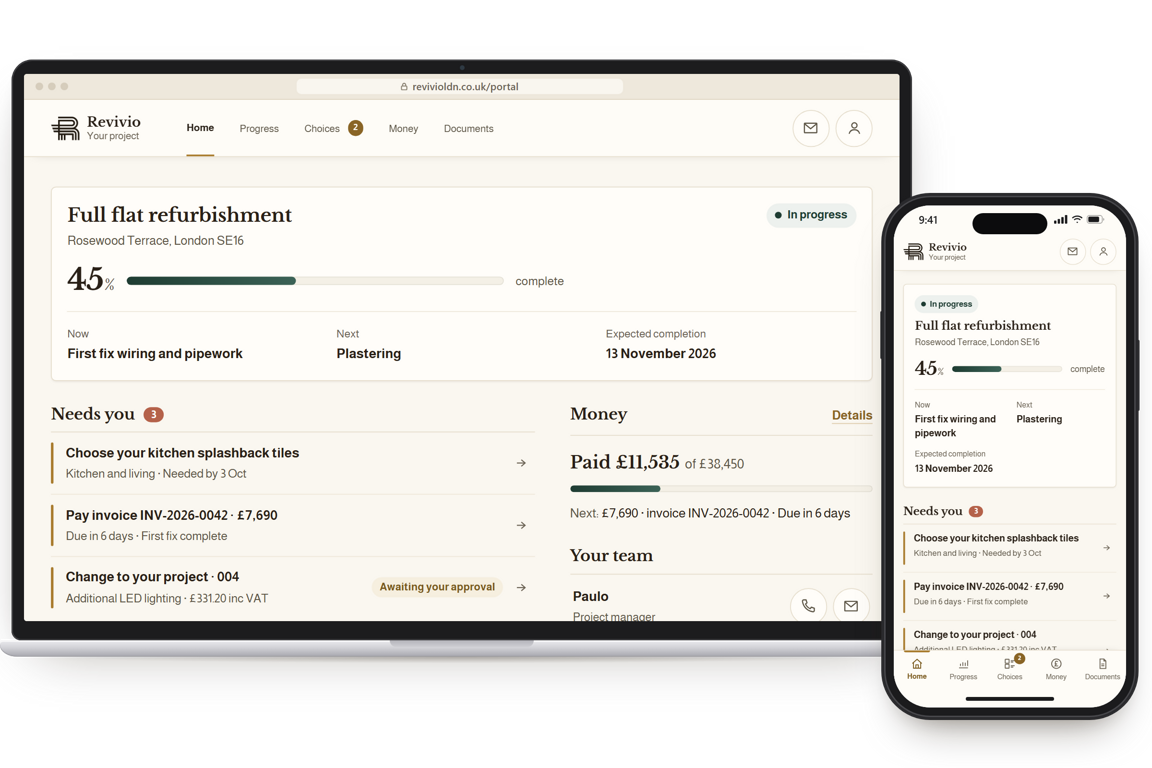
Five places, one project
The same information we work from, kept up to date as the job moves — not a summary produced when you ask for one. The same five places on a phone and on a laptop.
Your project at a glance.
How far along it is, anything waiting on you, what's happening this week and the latest photos from site.
What's been done, and what's next.
Every stage of the job, photo updates from site, who's on site and when, and a room-by-room checklist.
Everything you're deciding, in one place.
Your idea board for finishes, your products list, and the decisions we need from you, each with a date.
What you've paid, and what's next.
Paid so far against the total, the next payment with its invoice, and the payment schedule from your quote.
Your paperwork, kept safe.
Your quotation, drawings, certificates and guarantees — during the job and for years after it.
Talk to us, and keep a record.
Ask a question, ask about an update or report a problem with a photo. It stays with your project, not in a text thread.
Choose your finishes
Picking tiles, taps, handles and paint usually means a dozen open tabs. Your idea board gathers everything in one place — and because we can see it too, we can help you decide.
- Paste a link from any shop and we fill in the name, picture and price for you.
- Shortlist your favourites and compare up to four side by side.
- We tell you whether it's in stock, how long it takes to arrive and roughly what it costs.
- Pick one and it moves to your products list, ready for you to order and add a delivery date.
Choosing isn't placing an order and doesn't change your contract — we price it and confirm it with you first.

- 01Paste a link
- 02Shortlist
- 03Compare side by side
- 04Choose
- 05On your products — and on your schedule once it has a delivery date
Every figure, as it stands
No more adding up invoices from your inbox. See what you've paid, what's due next and what it's for — taken straight from the records we invoice from.
- How much you've paid of the project total, plus your next payment with its invoice and payment reference.
- Any change to the job shows its price up front, and nothing is added until you approve it.
- Your contract and any extras, such as materials we buy for you, are shown separately, so the numbers always add up.
- All figures include VAT.
You can also keep a private record of anything you buy yourself. Only you can see it.

Know what's happening
We post updates and photos from site as the work goes on — the surprises included, like a wall that turns out different from the drawings.
- All the stages of your job, and the one we're working on now.
- Who's on site this week, and when your deliveries are due.
- A checklist of the work in each room.
- Ask about any update with one tap, or send us a photo of a problem.

How you get in
No app to download. Your invitation arrives by email, and there is nothing else to set up.
We set your project up
Once your works are confirmed, your project is created with the scope, programme and payment schedule from your quote already in it.
You choose a password
An email invitation goes to the address on your quote. Choose a password and you are in, on whichever device you have to hand.
It stays open after handover
Your documents, certificates and guarantees stay available once the job is finished — which is usually when you need them.
Private to your project
Your portal shows your project and nothing else. Access is granted per project to you and to anyone you ask us to add — a partner, a landlord, an architect — and can be removed again at any time.
Nothing in it is public, none of it is indexed by search engines, and it is never used for marketing. Site photos only appear on this website or our Instagram if you tell us that's fine.
Your idea board is shared with us so we can help you choose. Anything you note about your own spending stays private to you.
Before you ask
Does the portal cost extra? +
No. It comes with every Revivio project, whatever the size of the job — there is nothing to add to your quote for it.
Do I need to install an app? +
No. It works in the web browser you already have, on your phone, tablet or laptop — and the phone version shows you everything, not a cut-down version.
Does choosing something on my idea board order it? +
No. Choosing something lets us know what you want and adds it to your products list. Nothing is ordered and your contract stays the same until we have priced it and confirmed it with you.
Can Revivio see my idea board? +
Yes, and that is what makes it useful. We can flag anything that will not fit, will take a long time to arrive or will change the price, before anything is ordered.
Can I keep track of what I spend myself? +
Yes. The Money screen has a private space to record anything you buy yourself, outside our invoices. Only you can see it, and it never affects what we charge.
I would rather just call you. Is that still fine? +
Of course. The portal saves you chasing us for updates — it does not replace talking to us. You will always have one point of contact and a number to call.
Can my partner or landlord see it too? +
Yes. Just tell us who to add and they will get their own invitation to your project. Everyone has their own access, so we can remove someone later without affecting yours.
What happens to it after the project finishes? +
It stays available so your documents, certificates and guarantees remain a link away rather than an email you have to dig for.
Every Revivio project comes with one.
Start with a ballpark figure — four quick questions, no obligation.